

Here are all the Brazil World Cup 2026 DLS kits for Dream League Soccer 2026: the canary-yellow home kit (with blue or white shorts), the Jordan Brand away kit, three goalkeeper kits and the CBF logo. Everything is 512×512 – tap COPY under any image and paste the URL into DLS.

Brazil’s 2026 set is made by Nike, with one twist: for the first time the away shirt carries the Jordan Brand Jumpman instead of the Swoosh. Here is what you get:
Table of Contents
| Kit | Main colours | Use it in DLS for |
|---|---|---|
| Home | Yellow shirt, green trim, blue or white shorts | Home slot |
| Away (Jordan) | Royal blue with a dark jagged graphic, yellow logos | Away slot |
| Home GK | Green with swirling pattern | Goalkeeper slot |
| Away GK | Green with fading black stripes | Goalkeeper slot |
| Third GK | Black with dark grey swirls, yellow details | Goalkeeper slot |
| Logo | CBF crest with five stars | Team logo |
Brazil Logo 512×512 URL
The CBF crest is a shield with a dark green base, a white cross carrying the letters “CBF” and a yellow border. Above it sit five stars, one for each World Cup title: 1958, 1962, 1970, 1994 and 2002.

The logo is a square 512×512 file, so it fits the DLS logo slot without being stretched. Want a round badge for your menus instead? See the circle national logos for DLS.
Brazil Home Kit 2026 for DLS
The home shirt is the classic canary yellow with green detailing on the collar and sides. A subtle all-over pattern, inspired by a distorted Brazilian flag, gives it texture up close, and the colour palette nods to the 1970 World Cup-winning team.

You get two versions of the home kit. The shirt is identical; only the shorts change:
- Blue shorts – the traditional Seleção look (image above).
- White shorts – a cleaner option, useful when your opponent wears dark blue (image below).

If you like comparing generations, put this shirt next to the Brazil World Cup 2022 kit for DLS or the Brasil Copa América 2024 kit. The 2026 version keeps the same yellow but adds more texture.
Brazil Away Kit 2026 (Jordan Brand)
The away kit is the talking point of the set. It is a royal blue shirt with a darker, jagged layered graphic, aqua side panels and the Jordan Jumpman in yellow where the Nike Swoosh normally goes. The crest sits in the centre of the chest.
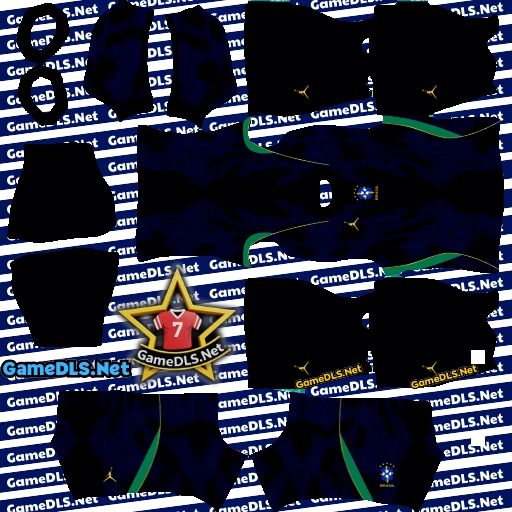
In DLS the blue away kit is your go-to against teams in yellow, white or light green. It clashes with dark blue sides, so against them stay with the home kit and white shorts.
Brazil Goalkeeper Kits 2026
There are three goalkeeper kits, so your keeper always has a colour that stands out from both teams.
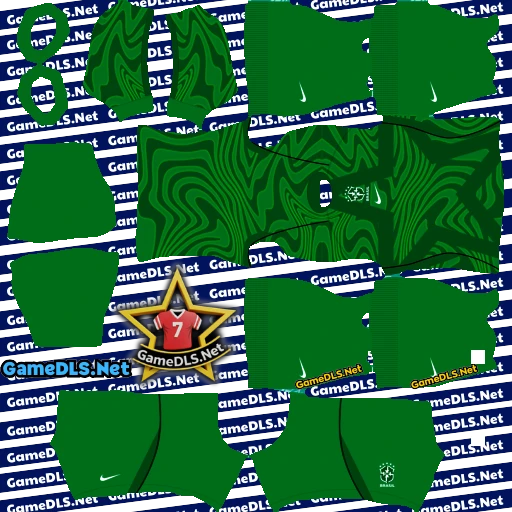
Home GK Kit
Vibrant green with an abstract pattern of swirling lines in lighter and darker greens.
Away GK Kit
Also green, but with a fading vertical stripe pattern in black across the torso and black collar and cuffs.

Third GK Kit
A black base with dark grey swirls and yellow crest, logo, “Brasil” text and number. The best choice when both outfield teams wear bright colours.

How to Import Brazil World Cup 2026 DLS Kits
- Tap COPY under the kit you want on this page.
- Open Dream League Soccer and go to My Club → Customise Team → Edit Kit.
- Choose the slot: Home, Away or Goalkeeper.
- Tap Download, paste the URL and confirm.
- For the crest, go back to Customise Team, open the logo option, tap Download and paste the logo URL.
Kit not loading? Quick fixes
- Error or blank kit: check you copied the whole URL, starting with https://, with no extra spaces.
- Kit looks wrong on players: you probably pasted a goalkeeper kit into an outfield slot, or the reverse.
- Still not working: switch between Wi-Fi and mobile data, restart DLS and paste again.
Brazil at the 2026 World Cup
Brazil were drawn in a group with Morocco, Scotland and Haiti and made it through to the knockouts. In the Round of 32 they came from behind to beat Japan 2–1, with Gabriel Martinelli scoring the winner in stoppage time.
The run ended in the Round of 16 with a 2–1 defeat to Norway – Brazil’s earliest exit since 1990. If you want to replay that match in DLS, both nations’ kits are on the site.
More Kits You Might Like
- Another Portuguese-speaking World Cup team: Portugal World Cup 2026 DLS kits
- A World Cup debutant with plenty of Brazilian-style flair: Cape Verde 2026 DLS kits
- Brazil’s most popular club: Flamengo 2025/26 DLS kits
- Every team in one place: all DLS kits and logos
FAQ – Brazil DLS Kits 2026
How do I import the Brazil World Cup 2026 kits into DLS 2026?
Tap COPY under the kit you want, then in Dream League Soccer go to My Club → Customise Team → Edit Kit, pick the Home, Away or Goalkeeper slot, tap Download, paste the URL and confirm.
Is there a Brazil third kit on this page?
The outfield set is the yellow home kit (with blue or white shorts) and the blue Jordan Brand away kit. The “third” design here is the third goalkeeper kit, alongside the home and away GK kits.
What size are these Brazil DLS kits and the logo?
Every kit and the CBF logo on this page is 512×512 pixels, the size Dream League Soccer expects, so they stay sharp in game.
Why won’t my Brazil kit download in DLS?
Make sure you copied the full URL (it starts with https://), you have a stable connection, and you are pasting a goalkeeper kit into a goalkeeper slot. If it still fails, restart the game and paste again.


